In real life most of the time we come in situation where we need to tell the name of place to other person just by seeing it or by its photograph and we hardly remember or know its name.As we don't have habit of remembering all.
Keeping this in mind Google has developed an application for Android phones which will surprisingly show you name of the place,book,landmark,logo and contact information(So that our memory will be more weaker ;p).I thought about this technology about 2 years back and thought Chinese would definitely make it possible but Google did it .
Check this official video -
Google Goggles is an visual search application for Android phones. Rather than using words,and long text take a picture of an object with your camera phone. And after taking it Google visual search mechanism searches for the image details.Displays the result just like normal Google search result.
If you don't want to take a picture of local business buildings like music shop or a Hotel then by using camera preview mode Google searches for and displays its name directly just by pointing to that place.
I think Google will need to work on it very deeply as on earth when there can be more than one person of same face likewise there are many landmarks and places which have replicas of it.
Currently you won't be able to identify animals,plants and cars.Else it would have been much easier for me to identify cars as I hardly remember versions and model of different car companies but if Google Goggles identify cars too then ask me any thing about cars :D
Android user can download Google Goggles just by searching for it in Android market using "Google Goggles" keywords .
Showing posts with label Google. Show all posts
Showing posts with label Google. Show all posts
Friday, December 18, 2009


Monday, November 23, 2009
Search image in Google on basis of color and types
Many of the times you try to get image of some specific kind . Having specific qualities like it's color, image type etc . Keeping this in mind Google has done developed advance search algorithms which actually response to the user queries correctly with proper image .
The image search has been modified and the results must really be appreciable .
To show this I have added some images showing what I am saying .
Search Image with Face type :

The image search is not restricted to color only but you can also search image of particular keyword on the basis of image type . Suppose we search for image with keyword "world" then the images of world are shown in adjacent block . And now the user can select the option like face , clipart or linedrawings etc . Accordingly
the image of face related to world else clipart related with world is shown to user.

Users will definitely be benefited with this search algorithm . As they can choose between different color of the same object . Suppose anybody who wants to buy Porche Carrera GT and has to look it in different shades then this is very much useful .


Really a useful search tool by Google .
The image search has been modified and the results must really be appreciable .
To show this I have added some images showing what I am saying .
Search Image with Face type :

The image search is not restricted to color only but you can also search image of particular keyword on the basis of image type . Suppose we search for image with keyword "world" then the images of world are shown in adjacent block . And now the user can select the option like face , clipart or linedrawings etc . Accordingly
the image of face related to world else clipart related with world is shown to user.

Users will definitely be benefited with this search algorithm . As they can choose between different color of the same object . Suppose anybody who wants to buy Porche Carrera GT and has to look it in different shades then this is very much useful .


Really a useful search tool by Google .
Friday, September 4, 2009
How to add Tag Cloud widget on blogspot blogs ?
As a blogger you need to update your site with interesting posts as well as you have to modify design . The design can be made more user friendly for that you can add widgets to your blog .
Blogger has introduced new widget which is Tag Cloud . I will guide you for installing new Tag cloud or label cloud widget for your site on blogspot. For Wordpress users the widget was released few years ago . But for a blogger user this is new . The old Label widget has been modified to show cloud like structure which is inspired from Wordpress.
The steps are .
1> Go to Blogger sign in there and open the Layout window in blogger.
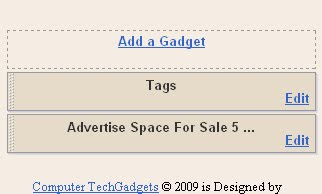
2> In Page Element you will find certain section on with Add a Gadget is written . Click on it
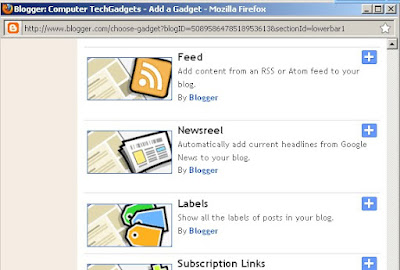
After clicking on it this window will open and you will find these gadgets and one of these is Label . You have to click on the plus sign in blue besides it.
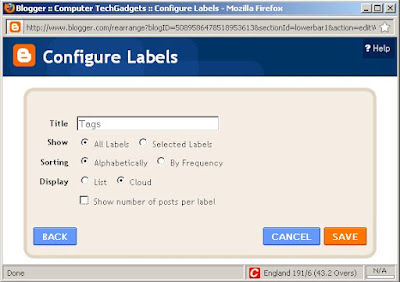
3> You will be redirected to gadgets properties . You can modify its name , and type.
You can customize the gadget to your simplicity as use . Show labels with posts frequency or show selected labels .
But most importantly select the cloud checkbox in Display field . This means you can have Labels in the form of cloud . This is not exactly like Wordpress Cloud widget but is somewere similar to it .
4> Save it and you are done . You can have a look at a similar gadget on my blog ( here itself check the section above footer )

Blogger has introduced new widget which is Tag Cloud . I will guide you for installing new Tag cloud or label cloud widget for your site on blogspot. For Wordpress users the widget was released few years ago . But for a blogger user this is new . The old Label widget has been modified to show cloud like structure which is inspired from Wordpress.
The steps are .
1> Go to Blogger sign in there and open the Layout window in blogger.
2> In Page Element you will find certain section on with Add a Gadget is written . Click on it

After clicking on it this window will open and you will find these gadgets and one of these is Label . You have to click on the plus sign in blue besides it.
3> You will be redirected to gadgets properties . You can modify its name , and type.
You can customize the gadget to your simplicity as use . Show labels with posts frequency or show selected labels .

But most importantly select the cloud checkbox in Display field . This means you can have Labels in the form of cloud . This is not exactly like Wordpress Cloud widget but is somewere similar to it .

4> Save it and you are done . You can have a look at a similar gadget on my blog ( here itself check the section above footer )

Subscribe to:
Posts (Atom)